Skip to content
GetProfit
Demo

Platform · Products and labels

Which products bring money in and which spend it

Every product gets its own label based on how it behaves in ads — from bestsellers to dormant ones that spend budget without a single sale.

  • Bestseller

    earning

  • Strong

    earning

  • Long tail

    paying off

  • Marginal

    on the edge

  • Loss-making

    sells at a loss

  • Dormant

    spends, no sales

  • Newcomer

    not in ads yet

  • To remove

    burned budget

This is how the portal sees the catalogue: every product has its group and its action.

Catalogue labelling

The catalogue is taken apart product by product, not campaign by campaign

The portal labels every item by how it behaved in ads over 12 months and immediately works out what each group costs in money. This is what the catalogue breakdown looks like in the portal:

5 819
catalogue products labelled
3 315
spend budget without a single sale
5 757 €
goes to them over 90 days
38
used to bring money and dropped out of impressions

An example breakdown in the portal — one whole shop, not a market average.

Product spend over 90 days

A product is never simply good or bad

Every shop has items that spend budget and take up space they haven't earned. The portal doesn't count “how much was spent in total” — it looks at each product separately and shows how both the budget and the catalogue itself are distributed.

Product spend over 90 days

33 270 €

  • Performing 8 650 € · 26%
  • Learning 11 312 € · 34%
  • Not working at full strength 13 308 € · 40%

How many products are in those same groups

2 055 SKU

  • Performing 116 SKU · 5.6%
  • Learning 1 729 SKU · 84.1%
  • Not working at full strength 210 SKU · 10.2%

10% of products take 40% of the spend — and barely pay off.

That is 63 € per product against 75 € for the ones that pay off.

Inside those 13,308 € are two different cases

And they are treated differently: for some you cut off the spend, for others you fix the price or the listing.

  • 70 products · 7,164 € Spend without a single sale: they were shown but sold nothing
  • 140 products · 6,144 € They sell, but pay off worse than other products in their category

An account in the portal: a catalogue of 5,819 products, a 90-day window. Figures from one shop, not a market average.

A product brought money and then vanished — you see that separately

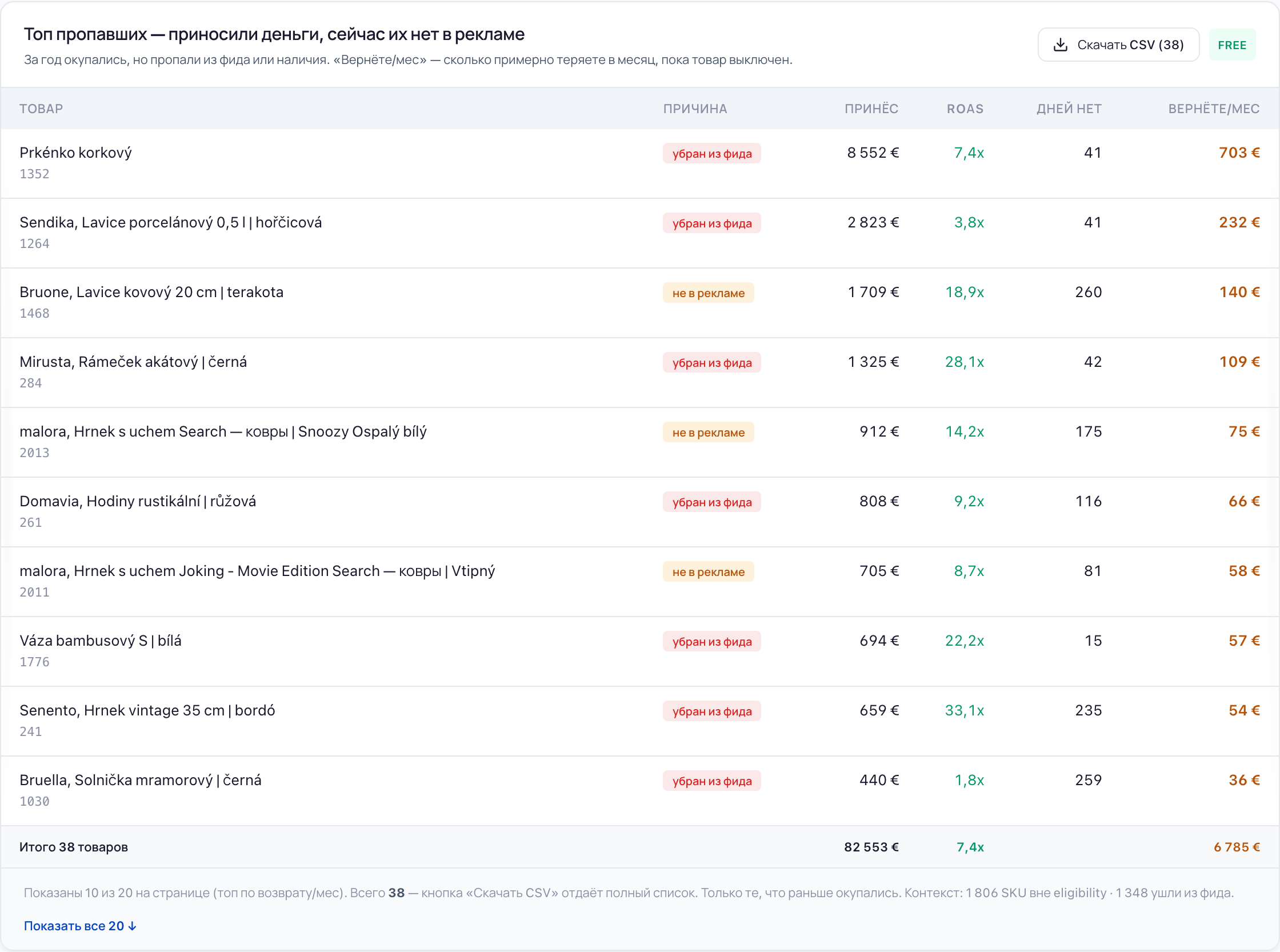
The portal picks out the products that used to sell consistently or pay off and are not showing now: the reason, how many days they have been out and how much revenue that costs per month. Bringing them back is cheaper than hunting for new points of growth.

Products that used to bring money and dropped out of impressions
Products that used to bring money and dropped out of impressions Enlarge →

A label isn't a line in a report, it's an instruction for the campaigns

Products are laid out in the campaigns by these groups: we scale the profitable, test the newcomers, limit the loss-making and exclude the candidates for removal. Every product falls into exactly one label — below is what stands behind each and what to do with it.

Bestsellers

Consistently drive sales

Example

A fast-moving item that sells all year round and holds the target ROAS. There are usually only a handful, but the shop rests on them.

What to do

Protect impression share and add budget — you can't afford to lose them.

Where this group sits among the others

Volume of money ↑ ROAS — payback → To remove Dormant Loss-making Marginal Bestsellers Strong Long tail
the spend doesn't come back pays off with room to spare
Newcomers — no data yet: never shown, or too few impressions to judge by

A schematic of how the groups relate, not a measurement: every shop has its own thresholds and figures.

The names and the actions are the same ones you will see in the portal: the site and the product call things by the same words.

What people usually run into

Three situations that send people to catalogue labelling.

“Going through the catalogue by hand takes a week, and a month later it's all over again”

You can merge exports across a few thousand products yourself. The problem is that it takes long, and the data goes stale faster than you reach the end of the list.

What the portal does

Labels the whole catalogue and recomputes the labels with every data refresh. Any group can be exported as a list.

“The budget goes somewhere, and where is anyone's guess”

There is spend, there are sales, but which part of the money works and which doesn't shows up in no report.

What the portal does

Shows how spend is spread across the groups and names the amount that isn't working at full strength.

“The product was selling, and then it disappeared”

An item was bringing money, then quietly dropped out of impressions: out of stock, gone from the feed, failed review. You noticed a month later.

What the portal does

Keeps a separate list of the missing: the reason, how many days they have been out and how much revenue that costs per month.

Access

Google Ads and Merchant Center. Sign in with Google in one click — we change nothing in the account without your consent

Plan

Catalogue labelling is in every plan, including the free one; on the free plan exports are capped by count

History

Labels are computed from a product's behaviour over 12 months

Screens from an account in the portal.

Common questions

Where do the groups come from? Did you make them up, or is it a Google standard?

It is our own method. Google doesn't compute groups like these: it shows metrics per product and leaves the “scale or limit” decision to you. We label the catalogue by behaviour over 12 months and write an action next to each group.

What does it take to see the labels?

Signing in with Google: one sign-in connects both Google Ads and Merchant Center. Labels are computed without Merchant Center too, but some of the reasons behind the products that dropped out will stay unknown.

Can I take the lists away with me?

Yes, any group exports to CSV, and for the changes there is an export in Google Ads Editor format. On the free plan exports are capped by number of products.

I have few conversions. Will the labels show anything at all?

Yes, but read them with care: products with no history land in “newcomers”, not in “loss-making”. The “dormant” group is about the ones that spend budget without a single conversion, and it shows even at a small volume.

See how your catalogue is labelled

Sign in with Google in one click. The portal changes nothing without your consent.

Label your catalogue