Now
- Title
- present
- Price
- empty
- Photo
- empty
- GTIN (barcode)
- empty
- Description
- shorter than 50 characters
- Google category
- present
Google gives a product like this no impressions
Platform · Feed and Merchant Center
The feed is the list of your products that the shop hands to Google; it lives in your Merchant Center account. The portal goes through it and shows which fields are empty, on how many products, and what that does to impressions.
Sign in with Google in one click — both Google Ads and Merchant Center. We change nothing in the feed itself.
Now
Google gives a product like this no impressions
After the change
The product is eligible for impressions, and Google understands exactly what you sell
A diagram: one product card before and after the change. The portal treats a description under 50 characters as short — that is our threshold, Google has no minimum.
Feed analysis
The portal takes your catalogue from Merchant Center, breaks it down and scores the feed quality: how many products have each field filled and how many have it empty — and, most importantly, which products don't get into ads at all or serve with limits, and why. The dark part of the bar is filled, the coloured part is empty.
Products in the catalogue
6 022
Without this a product isn't serving in Google at all
91,2% filled
50,2% filled
68,4% filled
With this a product serves, but worse
25,3% filled
30,3% filled
Four more checks — category, brand, availability, condition — are fine. The portal folds them into one row so they don't get in the way.
A photo and a price Google requires outright: without them a product doesn't reach the results. A barcode doesn't block impressions, but with it Google understands better what product you are selling and compares offers that share the same code.
An account in the portal: nine feed checks, scan 01.04.2026. One catalogue, not a market average.
Merchant Center tells you what is broken on an individual product: disapproved, limited, a warning. The portal looks wider — at Google's own recommendations and at our experience: which products get impressions and which don't, and why. It also shows what Google will not say outright: a product like that draws no complaint, but Google will show it less often — it simply doesn't understand what you sell. For each of the nine checks you can see how many products are affected and what changed since last time, with a button next to it to download the list as a table.
Green notes like “+40% impressions” are market averages, not a calculation for your shop. The portal labels them exactly that way: a benchmark, not a promise.
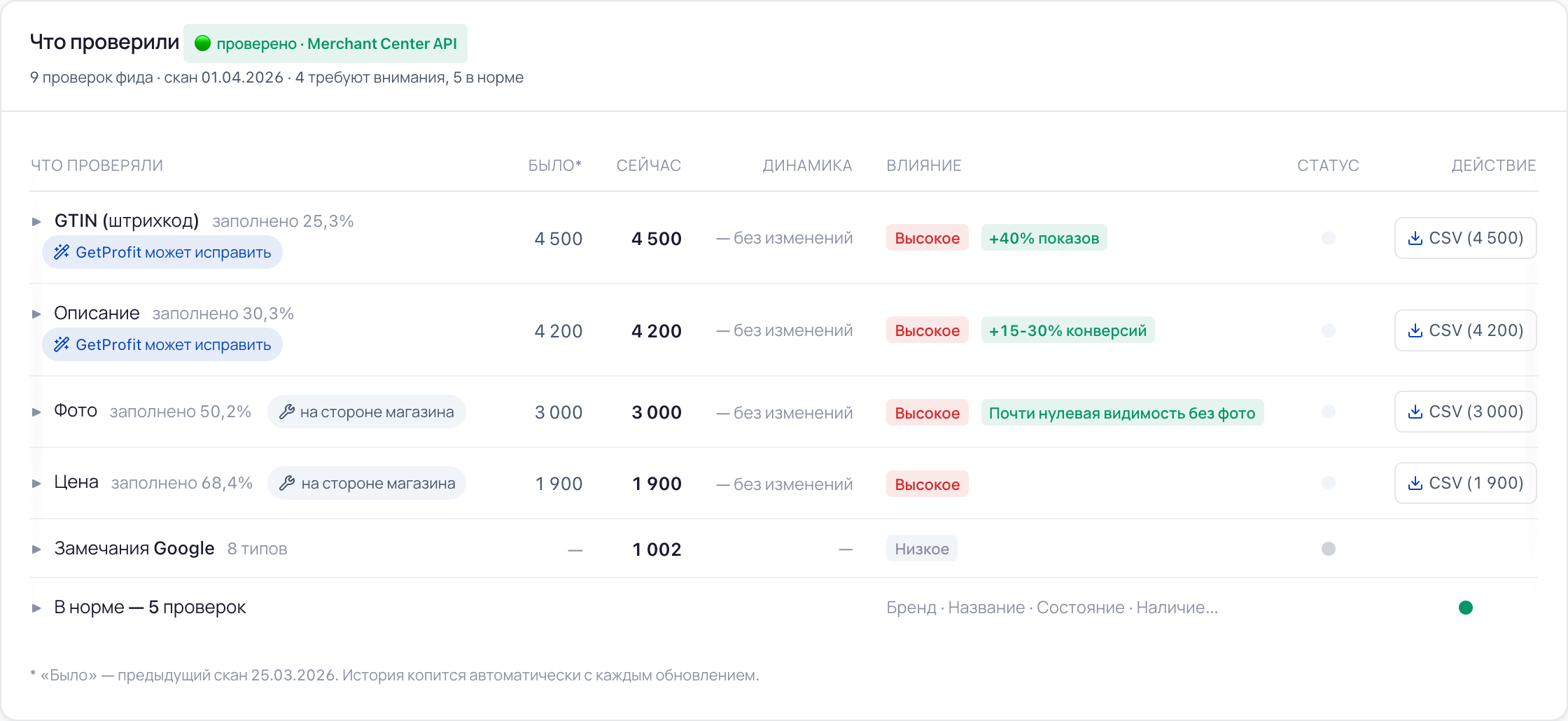
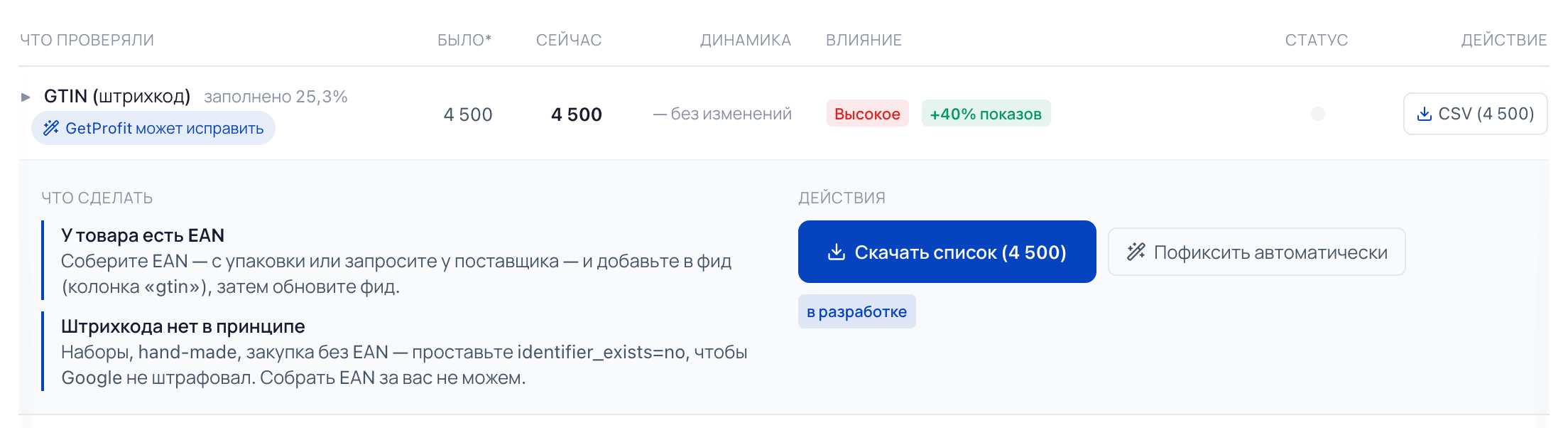
Bundles, hand-made, sourcing without a code — not everything has a GTIN. That is why this check opens into two scenarios. If the code exists, the portal says where to get it and which feed field to write it into. If the code doesn't exist, it offers to set the “no barcode” flag (identifier_exists=no). Both are for one and the same thing: so that Google understands what product it has in front of it and how to show it further. The portal cannot collect barcodes for you — and it says so.
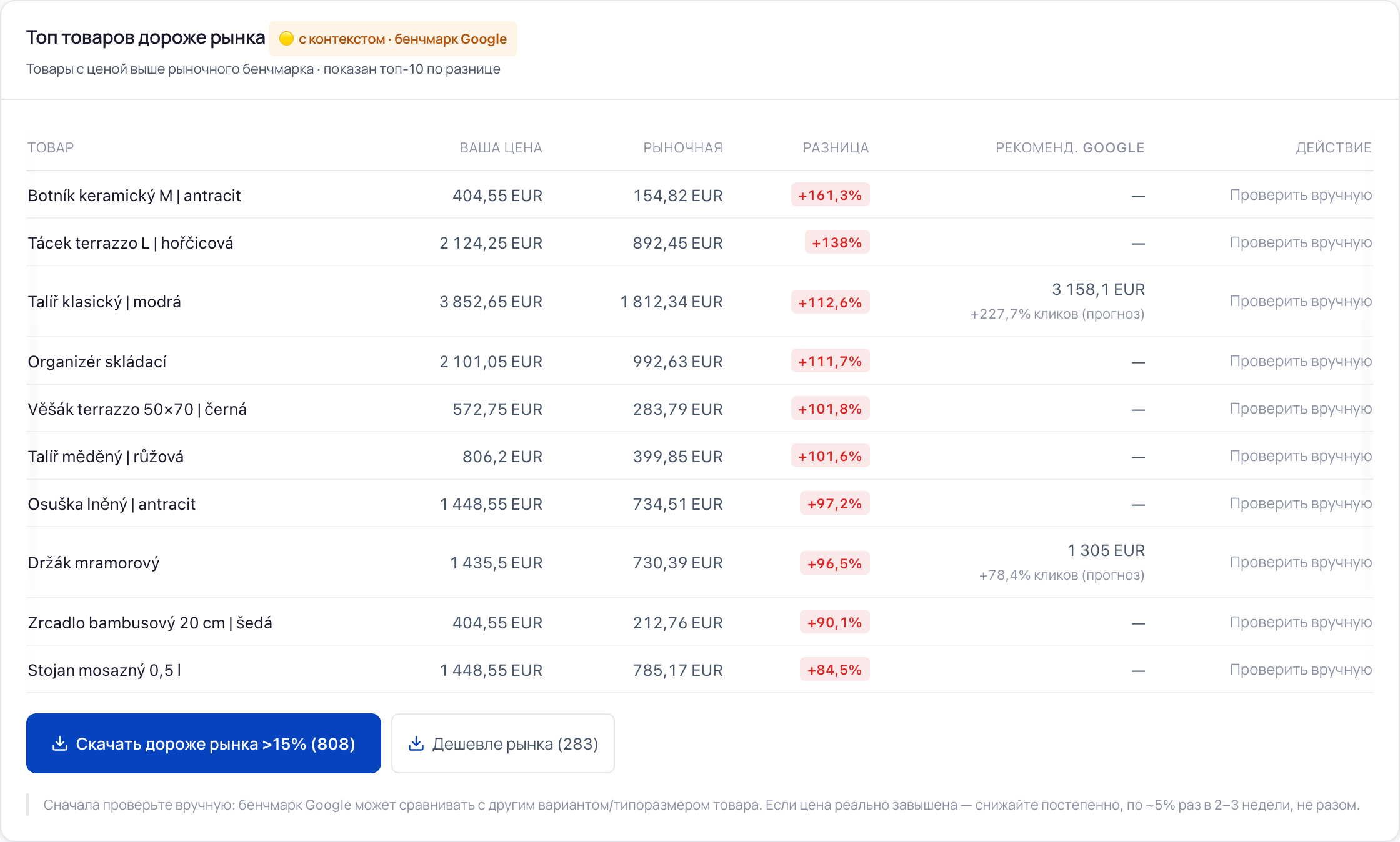
The portal takes from Google the data on how far your prices differ from those of competitors: it knows what the same product costs in other shops and returns the average price for your category. The catalogue is laid out along it — you see the products priced noticeably above the market, and the price Google suggests where it names one. Google uses that same data itself when it chooses where and at what moment to show a product.
The portal warns you right there: Google may have compared your product with a different size or configuration. So check the list yourself first, and lower the price gradually — by about 5% once every two or three weeks, not all at once.
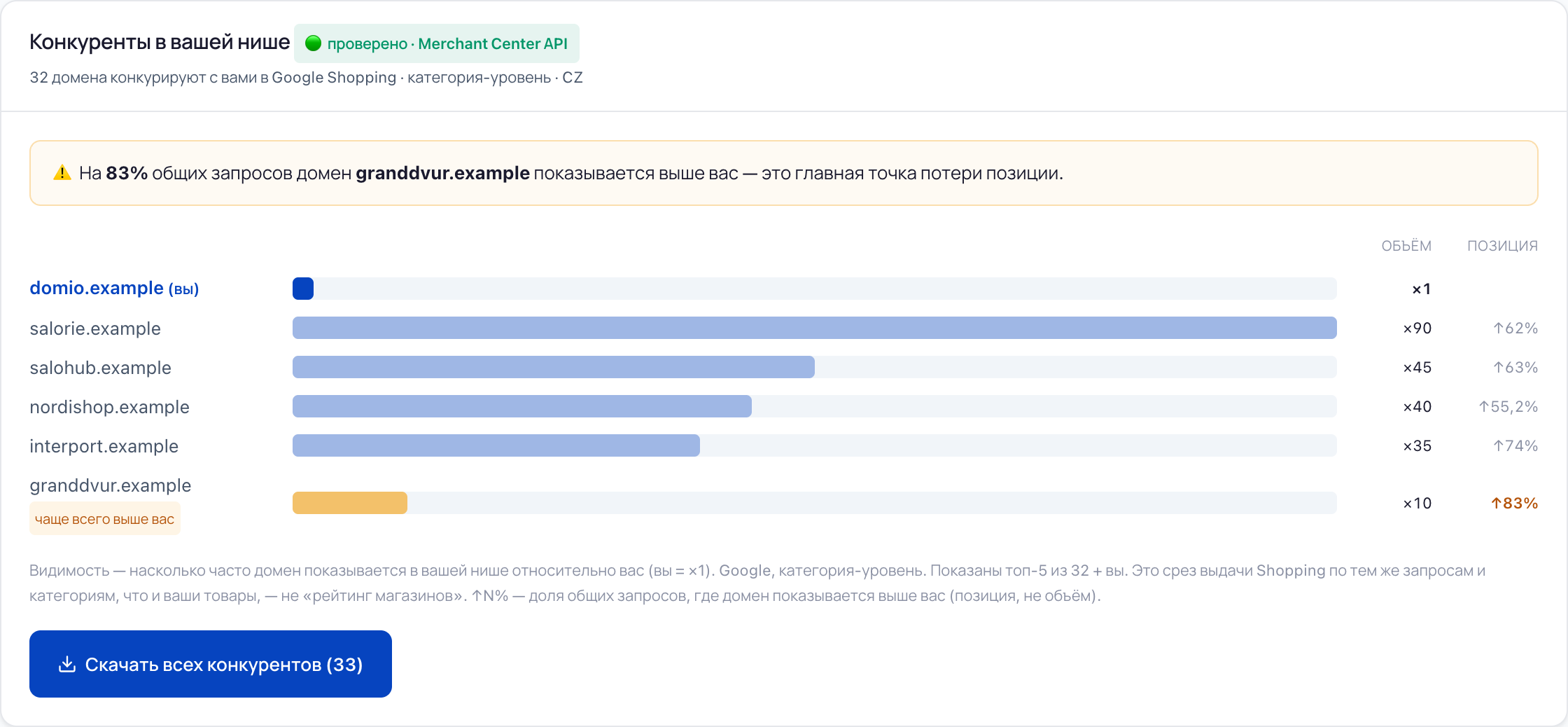
Merchant Center also shows who else sells what you sell: sites that Google returns for the same queries and categories as your products. The portal counts two different things separately — how often a shop shows at all, and how often it stands above you. A small shop may show rarely and still end up above you almost every time.
Three situations that make people open the feed analysis.
Diagnostics is silent: no disapprovals, no warnings. The products meanwhile move sluggishly, and it isn't clear why.
What the portal does
It counts not only the violations Google names, but also what affects serving indirectly: whether the title is filled and the description isn't too short, whether there is a photo, a barcode, a category and a brand, and how far your price differs from the market one. An empty field usually doesn't block impressions, but a product with one serves worse — the portal names which field it is and how many products have it.
You can export the feed and go through it in a spreadsheet. That is a week of work, and a month later the catalogue is already different.
What the portal does
It breaks down the whole catalogue and rebuilds the analysis with every update — by hand that is a week of work, and by the end of it the export is already out of date. For the problem fields it gives a ready list of products as a table, not a “take a closer look”: you need to work with the part of the catalogue that holds you back, not with all five thousand rows.
The budget is being spent, impressions are not growing. Bids, competitors, products — nothing to check them against, and everyone advises something different.
What the portal does
It shows where a product gets lost before a shopper even sees it: disapproved by Google, empty required fields, a price noticeably above the market. And who in the niche shows above you.
Access
Google Ads and Merchant Center. Sign in with Google in one click — we change nothing, neither in your account nor in the feed, without your consent
Plan
Merchant Center: diagnostics and recommendations — in every plan, including the free one
Automation
Auto feed fix — the Scale plan, currently in development
The screens come from an account in the portal. Every check is compared with the previous one: the “was” and “now” columns build up by themselves.
A product can be filled in perfectly and bring no money — and the other way round. The same catalogue from another side.
Which ones earn, which burn budget, which never show at all
See the section →
How much of the catalogue reaches sales, where the budget goes and whether you have a season
See the section →
A grade, a score and a breakdown across four areas — where to start
See the section →
Merchant Center shows what is broken on an individual product — one problem at a time. It doesn't add the catalogue up: how many products have no barcode, how many have a two-line description, how many are priced above the market. The portal counts what Google itself looks at — and that is the fill rate of nine fields and the comparison of prices with the market — keeps a history for every check and gives you the list of products as a table.
No, the portal only reads. But Google has no separate read-only access: the same access is granted for both reading and writing, which is why the list of permissions on Google's screen sounds broader than what the portal does. If you'd rather not hand that over — sign in with a Google account that holds the Read only role: the portal inherits its permissions. Auto feed fix is a separate capability of the Scale plan, it is in development now, and whether to switch it on is up to you.
These are market averages, and the portal has written exactly that under the table: an estimate based on market averages. We don't guarantee the uplift — your catalogue, your niche and your competitors have their own numbers. What we do promise: to name the products with an empty field, and to say what to do with them.
No. The barcode check has a second scenario: if the code really doesn't exist, the feed gets the “no barcode” flag — identifier_exists=no — and Google stops treating it as a gap. The portal says this plainly, and just as plainly adds that it cannot collect barcodes for you.
Sign in with Google in one click — both Google Ads and Merchant Center. We change nothing, neither in your account nor in the feed, without your consent.
Check your feedTell us about your store and your question — we reply during business hours. If a call is easier, leave a phone number.
GetProfit analyses your Google Ads and Merchant Center: it shows which products bring sales and which spend budget with no result, checks the feed and the conversion setup, and gives an account score with recommendations.
By continuing, you agree to the Terms of Service · Privacy Policy