Skip to content
GetProfit
Demo

Platform · Conversion check

What your ads are really learning on

An order counted twice. An amount substituted for the real one. A payment several times larger than your usual basket. In the report all of these are ordinary conversions — and those are what your ads learn on. The portal checks what stands behind them.

What the portal checks

  • Event

    Whether your ads learn on a purchase or a lead, and not on a page view or an add to cart.

  • Value

    Whether the real order amount arrives together with the order — or every order carries one and the same number.

  • Duplicate goals

    Whether two goals count the same order at once — and whether your ads are learning on three different goals at the same time.

  • Amounts

    Whether there are orders many times larger than your average order value.

Event ×Value ×Duplicate goals ×Amounts = Trust in the campaign's numbers

The checks don't add up, they multiply: a weak one drags the whole result down. All campaigns then roll up into a single number for the account — the more money runs through a campaign, the more it moves that number.

The setup is right — the numbers still lie

The tracking works. That doesn't yet mean it counts the truth

The usual check answers one question: “is the data arriving?”. The portal answers another one: “is it what it looks like?”. Four cases where the answer to the first is yes, and to the second — no.

Every order comes in at one and the same amount

The conversion settings hold one fixed number, and it is that number that goes to Google, not the order amount. Revenue in the report is simply the number of orders multiplied by it. ROAS computed on that means nothing.

How the portal sees it

The portal compares that number with what actually arrives. And it catches the second case: the settings say “pass the real amount”, while in fact every order still carries the same single number.

One order is counted twice

A second goal runs alongside your purchase goal: an import from analytics, an old tag, a goal from your shop platform. Both are primary, both fire on the same order. The account ends up with more orders than there really were.

How the portal sees it

The portal sees two primary goals counting one and the same purchase, and lowers trust for the campaigns where this happens.

A single payment many times larger than a normal order

A wholesale shipment, a test order, a checkout glitch — one row whose amount is many times your usual order value. Google reads it as a success and goes looking for more buyers like that.

How the portal sees it

The portal keeps such conversions in a separate list: date, campaign, product and how many times over the order value the amount went. The list exports to CSV so you can work through it in your account.

The ads learn on a funnel step

The primary goal is an add to cart, a checkout start or a page view. Google honestly optimises what it was told is the goal — started actions instead of paid orders.

How the portal sees it

The portal separates purchases and leads from everything else and shows which goals are primary and really fire, and which are only listed.

Trust in the numbers

One number instead of a list of remarks — and it is counted by money

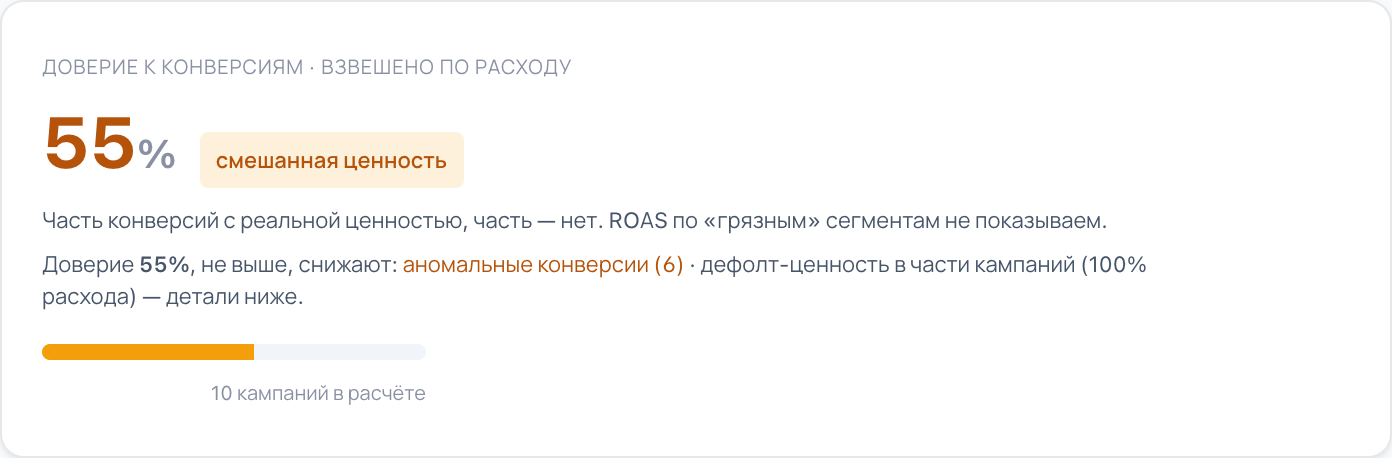
Conversion trust is not an average score across campaigns, it is an average across money: a campaign weighs exactly as much as the spend running through it. Ten neatly configured campaigns on pennies don't save an account where the main budget goes through the problem ones.

And the number is explained right there: what exactly lowers it and in which campaigns. Not “there are remarks” — but which ones and where.

From an account in the portal: conversion trust and what lowers it
From an account in the portal: conversion trust and what lowers it Enlarge →

Why the number is what it is

The flawless campaigns here are the smallest ones

Column width is the campaign's share of spend, height is trust in its numbers. Two search campaigns are set up perfectly: trust 100%. Only 2% of the money runs through them. The other 98% is product campaigns, and there the real order amount arrives only in part, and in places doesn't arrive at all.

Height is trust in the campaign's numbers

Money-weighted average — 55%

Product campaigns (PMax + Shopping) · 98% of spend Search · 2% of spend

98% of spend runs through campaigns whose numbers raise questions.

Count the campaigns as equals and the picture looks better. But the money is not spread equally — and by money this is 55%.

The “Campaigns by type” section in the portal: 10 product campaigns and 2 search ones, a 90-day window. The numbers of one shop, not a market average.

What you can see about the account in ten seconds

Whether the ads learn on the right action. Whether real amounts arrive under the orders — all of them, some or none. Whether there is enough history to give a verdict at all. And how many goals are really in use: in this account three out of twenty-two fire, and another thirteen are old, in the archive.

From an account in the portal: event, value, data depth and how many goals are in use
From an account in the portal: event, value, data depth and how many goals are in use Enlarge →

What we show instead of ROAS

If the value can't be trusted, we don't show ROAS

This is not a note in small print. As long as the portal treats the order amount as real, it shows revenue and ROAS. Where the amount can't be trusted, we don't show ROAS at all, we grey out revenue with a “not trusted” mark, and we count by the number of orders and the cost of one order. Showing ROAS computed on a made-up amount would mean lying more neatly than the original report already does.

Value is real

The real order amount is passed — revenue and ROAS can be trusted.

  • Revenue we show
  • ROAS we show
  • Conversions we show
  • CPA — what one order costs we show

Value is default or mixed

One and the same number is substituted under the orders. We run the account by the number of orders and the cost of one order.

  • Revenue we mark it “not trusted”
  • ROAS we don't show
  • Conversions we show
  • CPA — what one order costs we show

Not “there is a problem”, but a list by name — with date, campaign and product

For every such conversion: the date, the campaign, the product ID and how many times the amount is above your average order value. You can then go through the list and decide on each one: confirm that it is a real order — or tell Google the conversion isn't genuine, so campaigns stop learning on it. The whole list downloads as CSV.

Anomalous conversions — review (6)

Amounts are multiples of the average order value. Value is real overall, but these specific conversions stand out.

↓ Download all (CSV) free
  • ! 2 134 · 15,8× the average order

    2026-03-16 · PMAX — весь каталог · item 1200

  • ! 1 757 · 9,3× the average order

    2026-03-12 · PMAX — ковры · item 1237

Show all 6 ↓

Confirm they are real, or exclude them as unreliable. To stop counting them — set up retraction (conversion retraction). If retraction isn't possible now — set it up for the future so fake amounts don't train Google.

From an account in the portal: conversions that stand out from the average order value — with date, campaign and product

Access

Google Ads. Sign in with Google in one click — we change nothing in your account without your consent

Plan

The conversion check is on every plan, including the free one

Window

90 days. Independent of the period selected on screen

The screens come from an account in the portal.

The conversion check is step zero. Everything else is counted on top of these numbers

Products, campaign structure and the account score all stand on the same conversions. If those can't be trusted, the neighbouring sections take it into account instead of pretending everything is fine.

Common questions

Everything is set up on my side, an analyst checked it. What will you find there?

An analyst usually checks whether the data arrives. The portal checks something else — what exactly arrives and in what volume. The usual finding is not that the tracking is broken: the settings say “pass the real amount”, while in fact every order carries one and the same number. Or a second goal runs alongside your purchase goal and counts the same orders. And one more thing: the check is weighted by spend — you can have a dozen neatly configured campaigns and almost the entire budget in the ones where the amounts are a mess.

How is this different from what I can already see in the Google Ads account?

The portal doesn't argue with the account — it asks different questions. Whether two goals count one and the same order. Whether the real amount arrives together with the order — or a substituted number. What share of your spend goes through the campaigns where this happens. The answers add up into one number, and underneath it says what that number is made of.

Do you check the attribution model and the conversion windows?

No. The portal looks at which goals are primary and really fire, what amounts arrive under them and how all of that is spread across your spend. The attribution model, the conversion windows and the counting method — one conversion per click or every one — it does not examine. There is no point in promising that before it exists.

Will the portal fix this itself?

No. The portal changes nothing in your account — no goals, no settings: it finds, explains and writes what to do about it. The changes are made by a person — by you or by us, but only with your consent.

I have few conversions. Will the check show anything at all?

If there are no conversions in the period at all, the portal will say exactly that: there is nothing to assess trust on. If there is less than three months of history, it will say the account is still learning and there is too little data, so we don't give a trust verdict yet. We don't draw a plausible number in place of an answer.

See what share of your numbers you can trust

Sign in with Google in one click. The portal changes nothing without your consent.

Check your conversions