Skip to content
GetProfit
Demo

Platform · Campaign structure

How many ad campaigns your shop can carry

Every campaign needs around 30 conversions a month for Google's algorithm to learn on it. The portal counts how many conversions your ads bring, says how many campaigns that is enough for, and goes through each of the ones already running.

Sign in with Google in one click. The portal changes nothing in your account — no campaigns, no bids, no budgets.

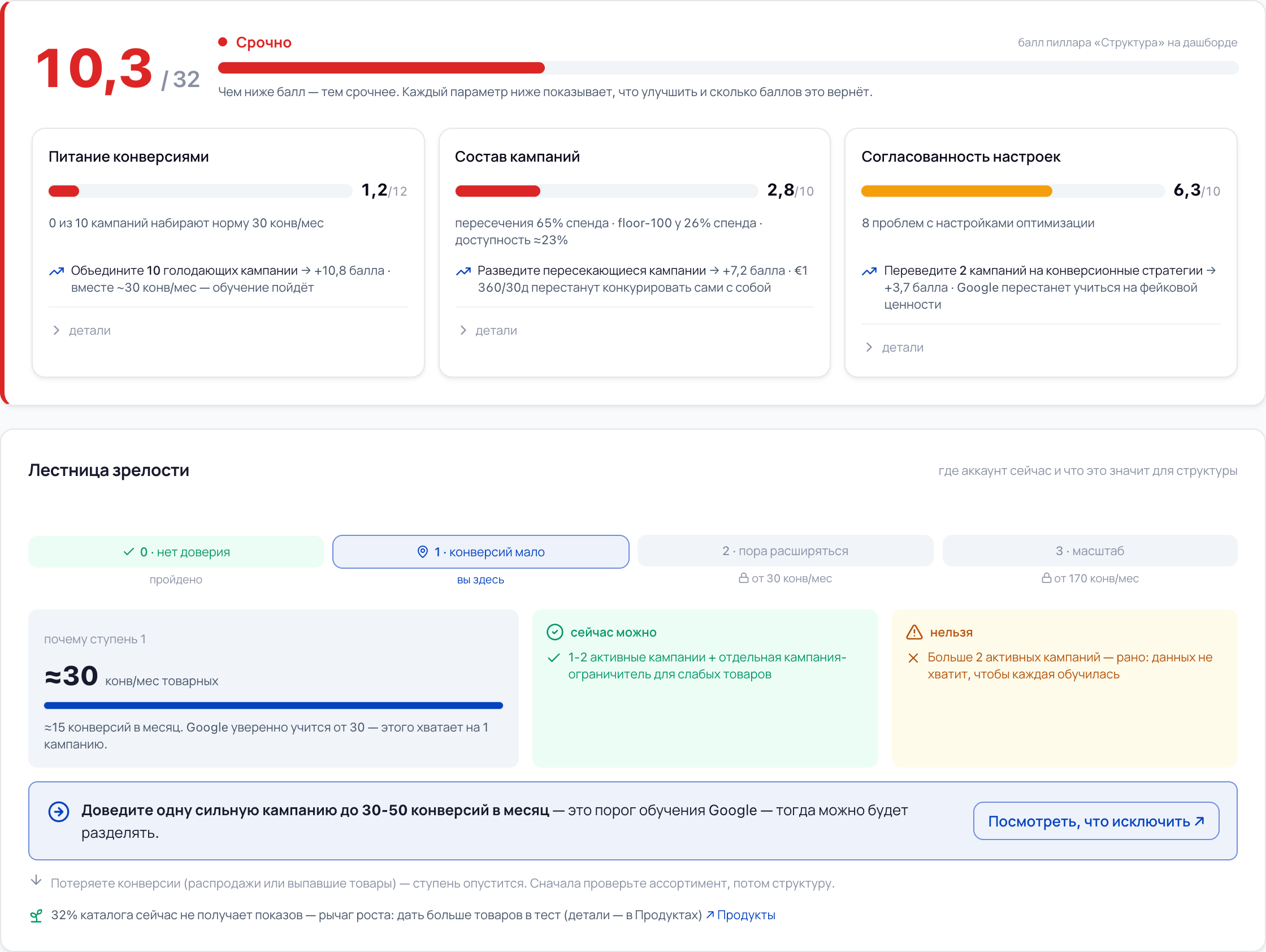
Top of the section: the score, its three parts and the maturity ladder below them
Enlarge →

Why campaigns don't learn

Ten campaigns share thirty conversions. The norm is thirty for each

Google's algorithm needs at least 30 conversions per month for every campaign to learn properly and reach its targets; ideally more than 50. In the account below all ten product campaigns together give exactly 30, and not one of them reaches the minimum bar. The question is not the size of the budget, but how many parts it is split into.

Google's learning threshold — 30 conversions per month

  1. PMAX — весь каталог 2,5
  2. PMAX — ковры 5
  3. PMAX — кухня и столовая 5
  4. PMAX — декор 4
  5. PMAX — мебель 2,5
  6. PMAX — тест новинок 2,5
  7. Shopping — старые товары 4
  8. PMAX — распродажа 0,5
  9. PMAX — подарки 1,5
  10. Shopping — резерв 2,5
Together 30

The same conversions in one campaign — and the learning threshold is met. Merging campaigns adds not a single conversion — it stops you splitting them. A campaign that reaches the norm learns more precisely and comes closer to its targets — and that is where ROAS and revenue come from.

An account in the portal: 10 product campaigns, a 90-day window. The numbers of one shop, not a market average.

Every campaign by name — and what is wrong with it

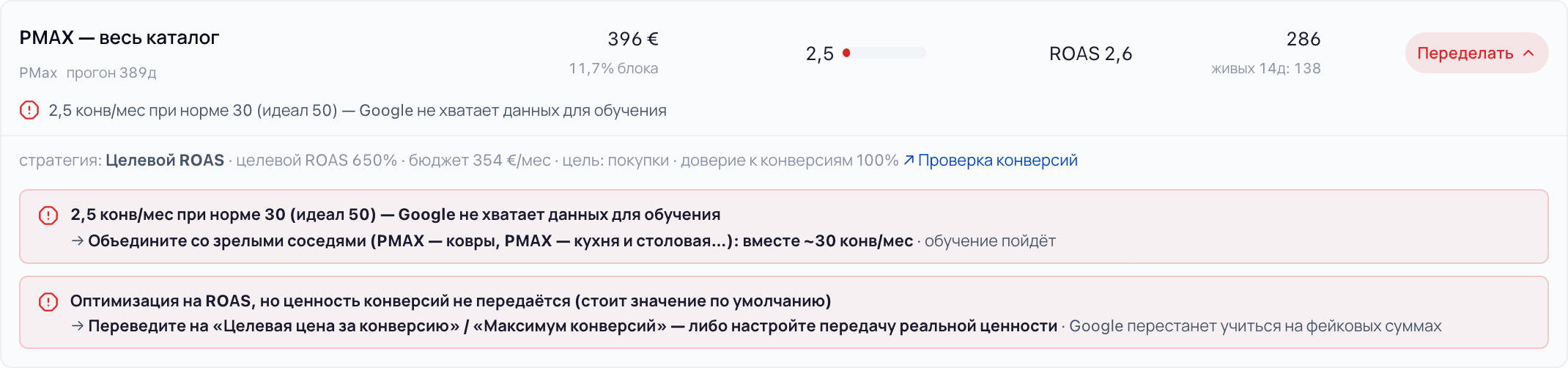
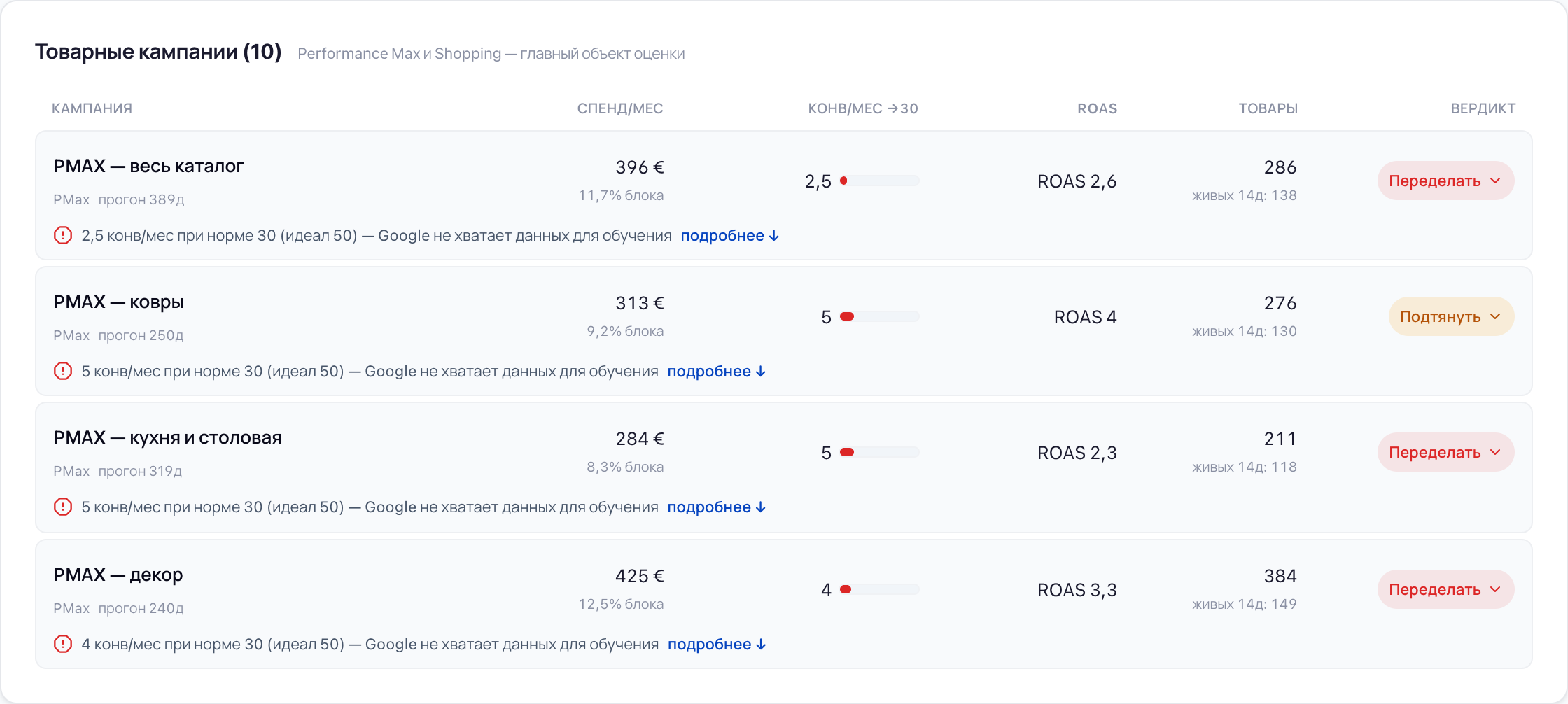
Every campaign has a row of its own: how much it spends and what share of spend it takes, how many conversions per month it brings against the norm of 30, ROAS, how many of its products really had impressions over the last two weeks — and a verdict. Expand the row and you will see the strategy, the target ROAS, the budget, the action the campaign learns on, the trust in its conversions and every problem with a ready prompt on what to do.

Product campaigns: spend, conversions against the norm, ROAS, products and a verdict for each
Product campaigns: spend, conversions against the norm, ROAS, products and a verdict for each Enlarge →
An expanded campaign row: settings, the two problems found and what to do about each
An expanded campaign row: settings, the two problems found and what to do about each Enlarge →

Six verdicts — and not one “it's complicated here”

The wording is the same one you will see in the portal: the site and the product call things by the same names.

  • Rebuild

    there are problems that need urgent attention

  • Improve

    the campaign works, but there is room for improvement

  • Working

    working as it should — we found no problems

  • Ramping up

    running for less than 45 days — too early to judge by conversions

  • On watch

    younger than two weeks, spend already noticeable, no conversions — we keep it in view

  • Not serving

    enabled, but effectively off: not a single impression in 90 days

A rung, not a sentence

The first thing the portal says about rebuilding is what you must not do right now

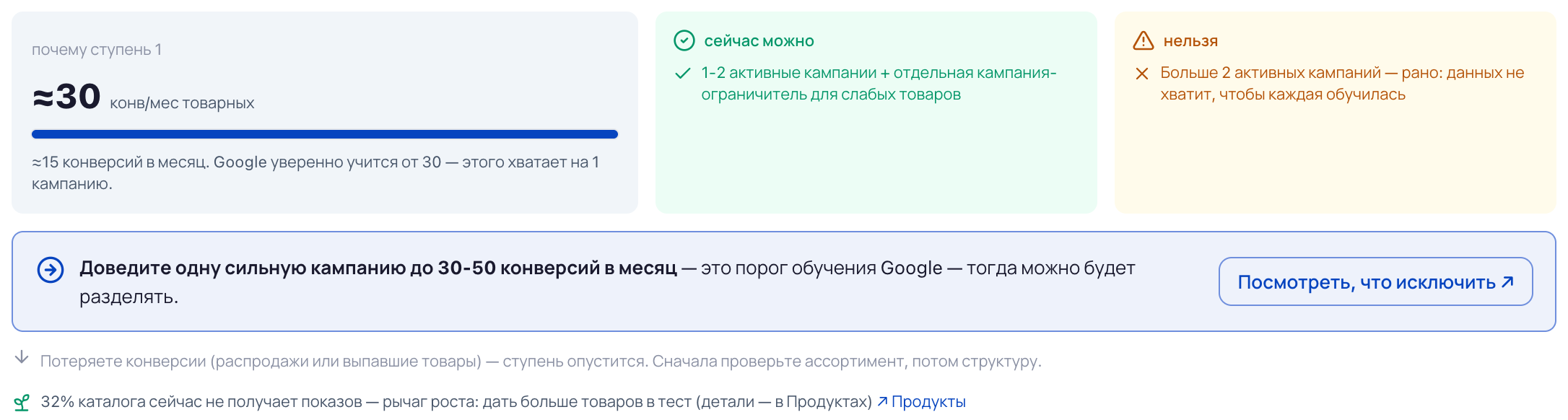
The section starts not with “rebuild everything”, but with what you must not do right now. The portal looks at how many conversions your ads bring and says how many active campaigns that matches and how many there could be. On the “too few conversions” rung, splitting campaigns is forbidden — there wouldn't be enough data for each. And only then does it recommend a structure: one where every campaign gathers enough conversions to learn, to scale and to improve its numbers.

Why this rung, what is safe to do on it and what is not, the next step — and how the rung can be lost
Why this rung, what is safe to do on it and what is not, the next step — and how the rung can be lost Enlarge →

Four rungs. What to do with your structure depends on which one you stand on

The rung is set by your numbers, not by our opinion. First the portal looks at whether your conversions can be trusted, then it counts how many of them the product campaigns bring: 30 a month opens rung 2, 170 opens rung 3. Below is what the portal allows and what it forbids on each of them, in its own words.

  1. 0 · no trust

    The conversion numbers can't be trusted

    the bottom of the ladder — start here

    safe to do now

    • review the structure as a plan for the future
    • fix the conversion data feed — and start gathering them again, correct this time

    not yet

    rebuild the structure on wrong data — Google will learn from garbage

  2. 1 · too few conversions

    Too few conversions

    entry: correct conversions

    safe to do now

    • one campaign, two at most
    • 80–90% of the budget on the main campaign

    not yet

    split into more than 2 campaigns — there won't be enough conversions for each

  3. 2 · time to expand

    Time to expand

    entry: from 30 conversions per month

    safe to do now

    • split products across campaigns — by revenue, ROAS or cost per conversion
    • give each its own target ROAS and budget

    not yet

    go beyond 2–3 campaigns — Google will lose data

  4. 3 · scale

    Growing carefully

    entry: from 170 conversions per month

    safe to do now

    • keep the current campaign core
    • carve new products out into separate tests

    not yet

    fundamentally change the structure — rebuild it from scratch

A rung can be lost as well: if conversions disappear, the portal moves it down and tells you to check the assortment first, and only then the structure.

How the portal reads your campaigns

Five passes over 90 days of Google Ads data. For each one — what it found in the account on the screens above.

  1. 1

    Decides which campaigns to assess

    The main thing is product campaigns, Performance Max and Shopping. Search the portal looks at separately and compares only with the product ones: if they perform noticeably worse, it lowers the section score and says by how much. Video, Display and Demand Gen it lists with their spend but does not assess — their job is not conversions, and measuring them by the same yardstick would be a lie.

    found in the account

    10 product campaigns, 2 Search

  2. 2

    Counts whether each campaign has enough conversions

    How many conversions per month each campaign brings. We count not by the calendar, but over the time the campaign has been running without a break: Google doesn't give the launch date, and a campaign could have been stopped and started again — then an “average over the period” would show something untrue. The norm is 30 conversions per month, the ideal is 50.

    found in the account

    not one of the 10 campaigns reaches 30 conversions per month

  3. 3

    Looks at what the campaigns are made of

    Overlaps: the same product serving from two campaigns at once for more than three days — they compete with themselves. Campaigns that are too narrow: fewer than 100 products, too little data on them to draw conclusions. And what part of the catalogue gets no impressions at all, because no campaign picked it up.

    found in the account

    overlaps — 65% of spend: 1,360 € over 30 days goes on campaigns competing with each other

  4. 4

    Checks the settings

    Whether the campaign's strategy fits the data coming into it. The most common breakage is a campaign optimising for ROAS while the order amount isn't passed to Google: the algorithm learns on the default value. The portal checks two more things: which action the campaign learns on, and whether the target ROAS is set too high against what the campaign actually delivers.

    found in the account

    8 problems with optimisation settings

  5. 5

    Puts the account on a rung

    How many conversions the product campaigns bring — that sets the maturity rung, and the rung sets what you can and cannot do with the structure right now. Not “the right structure in general”, but the one your conversion volume can carry today.

    found in the account

    rung 1 — one campaign, two at most

We always count over 90 days: the period selected on screen does not affect this calculation.

What people usually run into

Three situations that make people open campaign structure.

“Rebuilding campaigns is risky — the learning will reset”

Every rebuild wipes out what has been accumulated. Burned once, you don't want to try again, even when you can see something is off.

What the portal does

A structure is not reshuffled every week: it is changed for the season or once every few months, when demand shifts. And the portal doesn't call for rebuilding everything from the ground up — it strengthens what already sells, carves new products and those going out of season into separate tests, and watches that every campaign has enough conversions. On the bottom rung it directly forbids splitting campaigns. The point is not that changes are forbidden — it is that changes have to come in careful steps and on sufficient data.

“I have ten campaigns and everything seems to work”

Spend goes out, sales come in, the report is not empty. That each campaign on its own is short of conversions is not visible from the Google account: there is no line there saying “this campaign doesn't have enough to learn”.

What the portal does

It counts conversions for each campaign separately and puts the norm next to it. “Everything works” and “works at full strength” are different things: a campaign short of conversions has nothing to learn from, and it will not get better on its own. For those that fall short, the portal names the neighbours worth merging them with, and how many conversions they would have together.

“I've already been told to rebuild everything. Who do I believe?”

One contractor built it by category, another proposes a single campaign for the whole catalogue. Both argue from experience.

What the portal does

The portal argues differently: your data and one threshold — 30 conversions per month per campaign. Under every recommendation it says where it came from and how many points it returns. That can be verified, not taken on faith.

Access

Google Ads. Sign in with Google in one click — we change nothing in your account without your consent. Merchant Center is not needed for this section

Plan

The structure breakdown is on every plan, including the free one

Window

90 days. Independent of the period selected on screen

Automation

Auto campaign structure — the Scale plan, currently in development

The screens come from an account in the portal.

Structure answers “how many campaigns”. The neighbouring sections — “what to build them from”

The rung depends on conversions, and conversions depend on whether they can be trusted and whether there is anything to sell. Both answers are right next door.

Common questions

Will you get into my account and rebuild everything?

No. The portal changes no campaigns, no bids, no budgets: it counts, highlights what the numbers say will pay off, and gives a recommendation — whether to apply it is up to you. Nothing in your account changes without your consent. About the access itself: Google Ads has no separate read-only access, the same access is granted for both reading and writing, which is why the list of permissions on Google's screen sounds broader than what the portal does. If you'd rather not hand that over — sign in with a Google account that holds the Read only role in your account: the portal inherits its permissions and cannot change anything even in theory.

Is the threshold of 30 conversions something you made up?

No, it is Google's learning threshold: the algorithm needs about 30 conversions per month per campaign, ideally 50. We see the same on our own data — across the 150+ shops we have analysed: as soon as a campaign steadily gathers 30–50 conversions, it comes noticeably closer to its targets. What is ours here is that we measure the pace honestly, over the campaign's current run rather than over a calendar month. The launch date in Google's export is empty, and a campaign could have been stopped and started again — and then “averages over the period” lie.

Can you apply the recommendations for me?

Not today. The section shows what to change, and you make the changes. Automation is coming — auto-structure and applying changes through the Google Ads API are part of the Scale plan, which is still in development — but even then it will only fire on your own Apply button. Nothing in your account changes by itself.

Half of my budget is in Search and video. Will you assess those too?

Search — separately and relative to the product campaigns: if it performs noticeably worse, the portal lowers the section score and says by how much. Video, Display and Demand Gen are listed with their spend but not assessed — their job is not conversions, and measuring them by the same yardstick would be a lie.

I have just rebuilt everything. What will you show me?

That the rebuild is visible, and what came out of it. The portal recognises it by the age of the campaigns, and checks the settings and composition straight away — those read from day one — and once data accumulates in a couple of weeks it will say how well the rebuild worked and highlight the places worth touching up.
See how many campaigns your account can carry

Sign in with Google in one click. The portal changes nothing without your consent.

Analyse your campaigns