First — whether the numbers can be trusted
Any advice about campaigns stands on your conversions. The portal first checks what is behind them, and if they can't be trusted it puts analytics into the plan, not a campaign rebuild.
Platform · Auto-recommendations
The portal doesn't just show figures: for every finding it says what to do about it and explains what the advice rests on.
Sign in with Google in one click. The portal shows what to change, and you make the change in your own account.
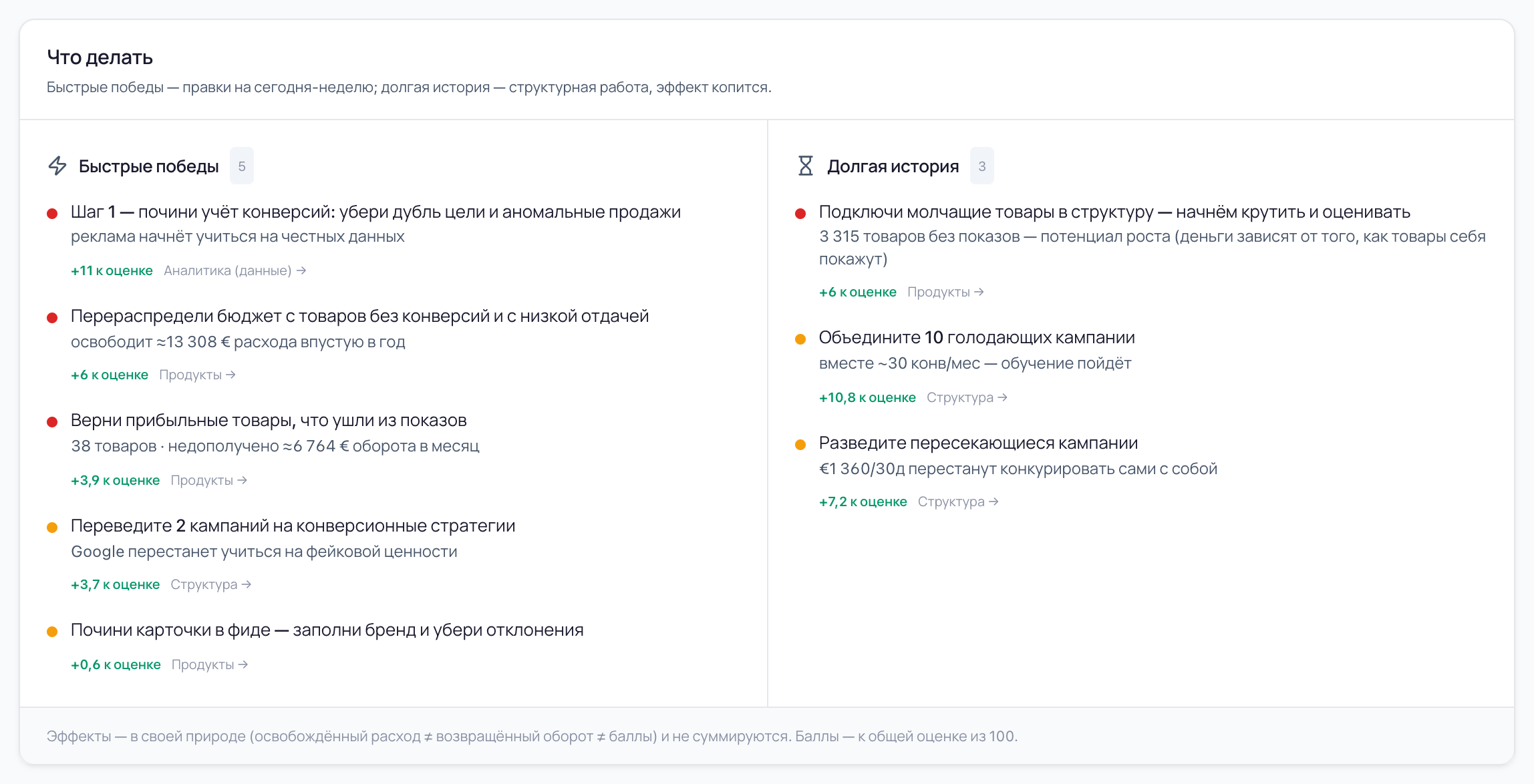
What a piece of advice is made of
Advice in the portal is not “optimise your campaigns”. It is one action, with a sum or a number of products from your shop underneath it, and next to it the section where the same finding can be opened and checked.

One action, not a list of tasks: “bring back the profitable products that dropped out of impressions”, “merge the starving campaigns”. Phrased the way it is done in the account.
Freed-up spend, the revenue being missed, or the number of products with no impressions — computed on your shop's history, not on market averages.
How many points out of a hundred the account score will rise by if the change is made. That gain is what orders the changes inside their column.
A link to the section with the breakdown: the same finding there, only with the numbers and the list of products or campaigns. The advice doesn't have to be taken on trust.
Order
If the ads are learning on something other than purchases, or every order carries a substituted value, the portal lowers the score and puts an analytics change into the plan: its effect is written out as exactly that — it unblocks a trustworthy calculation of the other sections. There is no point rebuilding campaigns on wrong numbers, and the portal doesn't suggest it.
While conversions can't be trusted, this change is marked as cross-cutting: it affects every section at once.
Next comes what costs money right now: spend with no sales, campaigns on the wrong strategy.
Within one level of importance the changes are ordered downwards: the one that returns the most points sits on top.
Quick wins
Fixed in the account today or this week: reallocate budget, bring back the products that dropped out, change a campaign's strategy.
Long game
Structural work whose effect compounds: merge campaigns, untangle overlaps, get products that are in no campaign into impressions.
Effect
Freed-up spend is money that will stop going to waste. Recovered revenue is money the shop is missing out on right now. And products with no impressions don't count as money at all. You could add this into one figure, but it would mean nothing, so the portal labels the plan plainly: the effects are of different natures and do not sum.
How much a year goes on products with no conversions and with a poor return. That money can be moved to what works.
How much revenue the shop is missing out on each month on products that used to sell and dropped out of impressions.
How many catalogue positions have never once been shown. The portal doesn't turn this into money: how much they will give depends on how they show themselves.
A common measure for every change: how many points out of a hundred the account score will rise by.
That is exactly how it is labelled under the plan in the portal.
Where the prompts live
There is no “Recommendations” item in the portal menu, and that is deliberate. A prompt appears where the problem was found: at the feed check, at a campaign's row, at a change in the change feed. And on the home screen they come together into one plan — so you can tell what to take on without walking round the sections.
Brings the analytics, product and structure changes together into one plan: quick wins and the long game.
What to fix in the tracking: take the primary goal off a funnel step, remove the second goal counting the same orders, pass the real value.
Three fields worth starting with: how many products are affected, what it changes for impressions and who fixes it.
What to do with the campaigns — and what must not be done at your conversion count. Every campaign has a prompt of its own.
The verdict on a change already made: keep it as it is, bring it back closer to what it was, or watch it.
Who makes the change
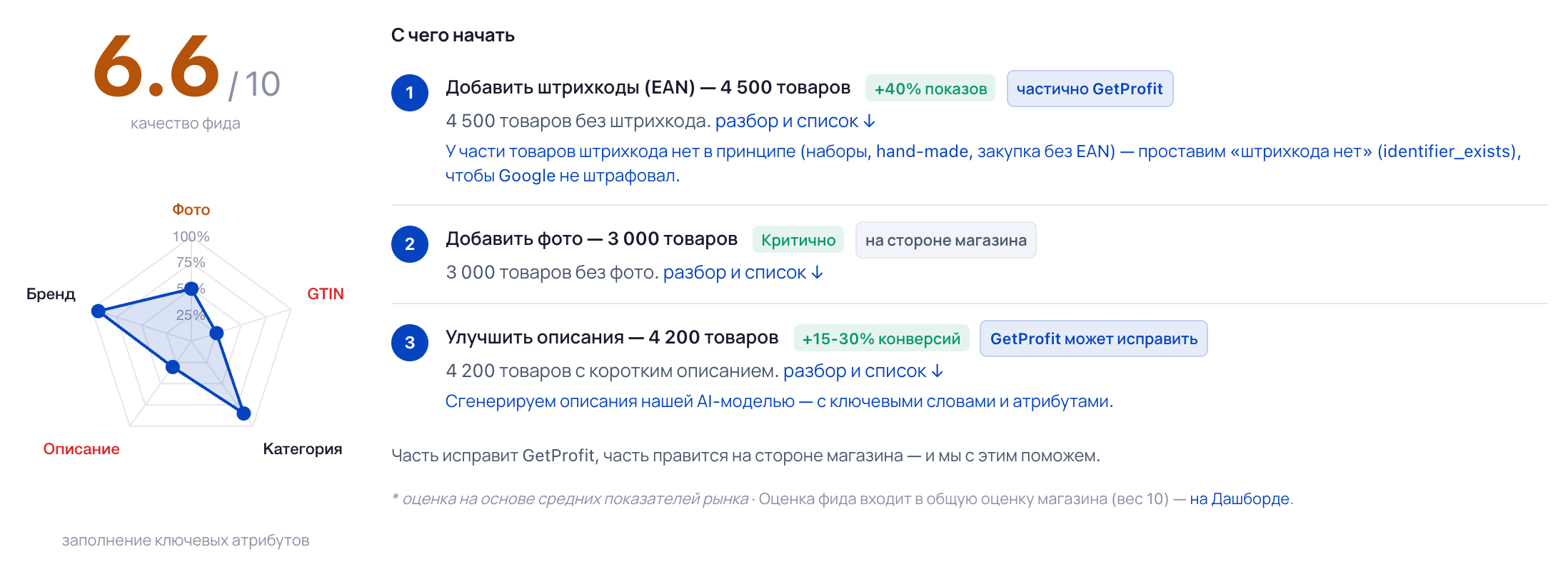
The portal changes nothing in your account: it finds, explains and writes down what to do. Some changes carry a note about who can take it on. It appears where the answer is clear from the finding itself, and it is not on every line.
you can do it
The change is on your side: passing data from the site, a setting in the CRM, the contents of a product listing. The portal writes down what exactly to change, but the hands have to be yours.
GetProfit can do it
A change in the Google Ads account itself — our team can take it on. Not the portal automatically, but a live person and only with your consent.
That is exactly what these notes are called in the portal — in the same words.
Both of them
There is nothing to argue with Google about: the learning threshold of 30 conversions per campaign, the requirements for a product listing, conversion-based strategies — those are its rules, and the portal computes by the same ones. The difference is in four things.
Any advice about campaigns stands on your conversions. The portal first checks what is behind them, and if they can't be trusted it puts analytics into the plan, not a campaign rebuild.
The portal places the account on a rung by conversion count and, next to “you can now”, writes “you can't”. On the bottom rung it plainly forbids splitting campaigns up: there wouldn't be enough data for each.
Google's reports are built on what was shown. The portal takes the whole catalogue, so products that are in no campaign make it into the plan: they aren't in the reports at all.
What happened to spend, revenue and payback after each change — and a conclusion in words: keep it, or bring it back closer to what it was. With the caveat that it may not have been the change alone.
One more difference: a Google recommendation is applied with a button right in the account. The portal makes no changes — where that stands today is written below.
If there are no quick changes, the portal says exactly that: “No quick fixes found — a good sign”. If no rebuild is needed — “No structural rebuilds needed”. It won't invent a task to keep the list from looking empty.
Three situations that make people open this list.
The numbers are in the account, in analytics and in the contractor's spreadsheets. None of it says what to take on come Monday and what can wait until the end of the quarter.
What the portal does
Brings the findings of every section into one list of two columns: what is fixed within a week, and what will take structural work. Each line is one action.
The contractor suggests one thing, an acquaintance another, the Google account a third. They all have the same argument: experience.
What the portal does
Under every piece of advice it says where it came from: which finding, what it gives and which section holds the breakdown. It can be opened and checked, rather than taken on trust.
The change was made, a month later revenue sank. Whether the cause was the change or the season there is no way to prove, and next time it is already frightening to touch anything.
What the portal does
Breaks down the changes already made: what happened to spend, revenue and payback — and says whether to keep it or bring it back. And notes straight away that assortment, season and demand affected revenue too.
Access
Google Ads. Sign in with Google in one click — we change nothing in the account without your consent
Plan
The list of changes is on every plan, including the free one
Who makes them
A person makes the change — you or our team. Automatic application is part of the Scale plan, and that one is in development right now
The screens come from an account in the portal. Campaign structure recommendations — Free.
Every line of the plan leads to its own section: the same finding there, only with the numbers and the list of products and campaigns.
A grade, a score and a breakdown across four areas — where to start
See the section →
Whether what you count is what gets counted, and whether the figures can be trusted
See the section →
Which campaigns work, which get in each other's way and what to rebuild
See the section →
Not today. The portal shows what to change, and you make the change in your own account. Changes in Google Ads itself can be taken on by our team — live people, and only with your consent. Automatic application through the Google Ads API is part of the Scale plan, which is still in development — and when it arrives, it will only fire on your own “Apply” button.
The portal computes by the same Google rules — the learning threshold, the requirements for a product listing, conversion-based strategies — and adds three things to them: a check on whether your conversions can be trusted; a list of what must not be done at your conversion count; and the whole catalogue, including the products that have never once reached impressions. The account score is not connected to the optimisation score inside Google Ads and is computed differently.
The gain is the difference between what a check scores now and its ceiling: close the finding and you get back the part that was missing. The method is the same for every account and measures the state of the account, not readiness to buy. The score will rise by the same amount whether you make the change yourself or with our help.
No. An empty column means these checks have no questions about the account: the portal says so — “no quick fixes found, a good sign”. If there is nothing to assess at all — no spend and no impressions in the period — it will say that too, rather than produce a list at random.
Together with the data: on the free plan it refreshes monthly, on Growth weekly, on Scale daily. A closed finding leaves the list by itself: the portal recomputes everything from scratch and no longer sees it.
Sign in with Google in one click. The portal changes nothing without your consent.
See your planTell us about your store and your question — we reply during business hours. If a call is easier, leave a phone number.
GetProfit analyses your Google Ads and Merchant Center: it shows which products bring sales and which spend budget with no result, checks the feed and the conversion setup, and gives an account score with recommendations.
By continuing, you agree to the Terms of Service · Privacy Policy